
Use the 10x scRNA Pipeline
Last updated 2026-04-18At a Glance
The 10x scRNA pipeline processes HISE scRNA-seq data. When you submit your sequencing data and a completed HISE submission sheet, the pipeline automatically handles alignment, quality control, metadata annotation, cell type labeling, doublet detection, and final file conversion, as shown in the image below. The result is a set of analysis-ready H5 and H5AD files.
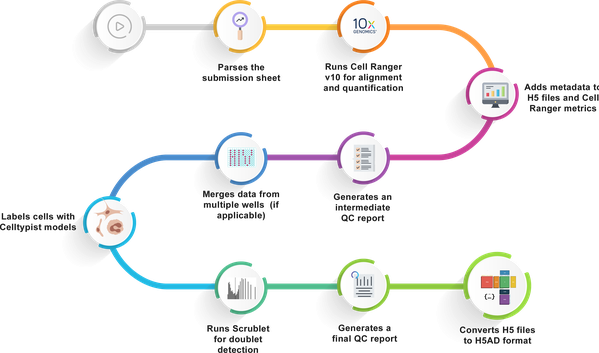
For an example of the proper submission sheet format, including column names for the Header, Sample, and Library tabs, see Use Correct Pipeline File Syntax (Tutorial). For questions about the pipeline or help using it, contact Support
.
When to Use This Pipeline
Use the 10x scRNA pipeline for any single‑cell RNA‑seq data generated on a 10x Chromium instrument using Flex chemistry. This is the default pipeline for new HISE uploads. The pipeline automatically supports all compatible library types—no special configuration needed.
To reprocess older 10x data using this pipeline, submit aSupportticket and choose "Pipeline" as your request type. Specify the dataset and pipeline version to be applied.
 Related Resources
Understand Automated Pipelines
Use Correct Pipeline File Syntax (Tutorial)