
Use the Read Files SDK Method (Tutorial)
Last updated 2026-06-15At a Glance
This document explains how to use read_files() to download files to your HISE IDE.
Error messaging for read_files has been updated to give you more information if some of your requested files can’t be downloaded. Any files that fail to download are summarized in the output as Some files failed to download: [list of file IDs], along with an error message like the one below, so you can quickly identify which inputs to fix or replace.
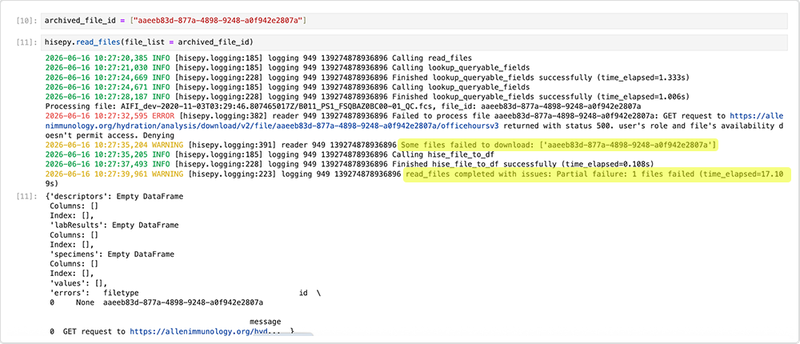
Files that download successfully in the same read_files() call remain available, allowing you to continue analysis or processing while addressing only the specific file IDs that failed.
If you have questions or need help, contact Support.
Signature
The signature for this method is listed in the following table. To toggle from Python to R, click the tabs.
hp.read_files(
    file_list: list = None,
    query_id: list = None,
    query_dict: dict = None,
    to_df: bool = True,
    is_public: bool = False,
)
readFiles(
fileIds = list | NULL,
queryId = character(1) | NULL,
query = list | NULL
isPublic = bool | FALSE,
)Parameters
The parameters for this method are listed in the following table. In each key:value pair, the value must be of type list.
Parameter | Data type | Description | ||
|
| List of UUIDS to retrieve | ||
|
| Value of the | ||
|
| Dictionary that allows users to submit a query | ||
|
| Boolean determining whether the result is returned as a DataFrame | ||
|
| Boolean determining whether to query public files or not |
Parameter | Description | |
| List of UUIDS to retrieve | |
| UUID from a previously saved search | |
| List of query params to search for. The format is similar to that passed to getFileDescriptors, but the fields correspond to fields in the Subject materialized view. NOTE: fileType with a valid entry must be present | |
| Boolean determining whether to query public files or not. |
Description
This function fetches HISE files and returns one or more objects when you pass in the following:
A list of file IDs (Python:
file_list| R:fileIds)A saved search ID (
query_id| R:queryId)A custom search query (
query_dict| R:query)
The object returned is either a dictionary (Python) or a list of data.frames (R). The dictionary or list contains keys [descriptors, labResults, specimens, values].
Instructions
The following instructions are written for Python. To adapt them for R, use the R function signature and parameters shown above.
In this step, we define the file IDs for this notebook. For details, see Use Advanced Search for Basic Queries (Tutorial).
Navigate to HISE, sign in, open an IDE, and import hisepy and any other libraries you want to use. For instructions, see Create Your First IDE (Tutorial).
Retrieve your own set of file IDs and then define them, as shown below. (The example below uses placeholder UUIDs—replace them with your own.)
# Define the file IDs used in this analysis

FILEIDS = ['4551e620-48db-4328-a2b0-122730cd128d', '6417a4c5-098b-4d70-8c24-951e1c1c44ce']
NOTE
To see what's in a given dictionary key, use the following format:
tmp['key']For example, let's see what's in the descriptors key:
tmp['descriptors’]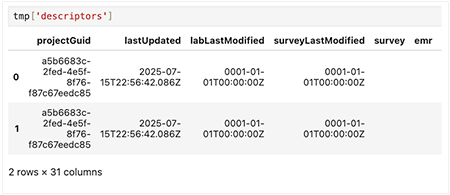
When you call read_files() with the to_df=True parameter, a dictionary is returned in which each key contains a pandas DataFrame. The to_df=True parameter arranges the data into a tabular format for easier analysis.
Pass your list of file IDs to
read_files().# Return dictionary output and print keys from read_files tmp = hp.read_files(file_list=FILEIDS, to_df=True) # Shows the class of the returned object print("Type of tmp:", type(tmp)) # Prints all keys (file IDs or names) in the dictionary print("Keys in tmp:", list(tmp.keys()))The following output is returned:

NOTE
If any files fail to download, the response includes both an error message and a Some files failed to download warning, along with a list of affected file IDs. For details, see the "At a Glance" section of this document.
Each key in the tmp dictionary represents a different dataset returned by hp.read_files(). The following table summarizes the content of each key:
Key | Description | |
descriptors | Project, sample, or subject metadata | |
labResults | Test results and IDs | |
specimens | Status and info on biological specimens | |
values | Raw data metrics | |
errors | File retrieval errors, if any |
1. For each key, use a loop to print the file ID, the value type, and a preview of the data.
for file_id, value in tmp.items():
    print(f"File ID: {file_id}")
    print("Type of value:", type(value))

# If it's a DataFrame, show the first few rows, as in this example:
try:
print(value.head())
except AttributeError:
print(value)
print("-" * 40)To see all column heads for a given data set, use the following line.
print(tmp['descriptors'].columns)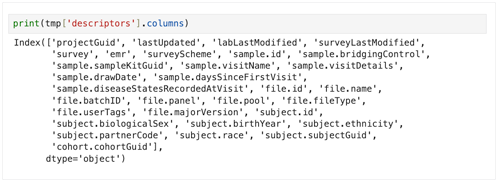
Get a summary of the DataFrame:
print(tmp["descriptors"].info())
print(tmp["descriptors"].describe(include="all”))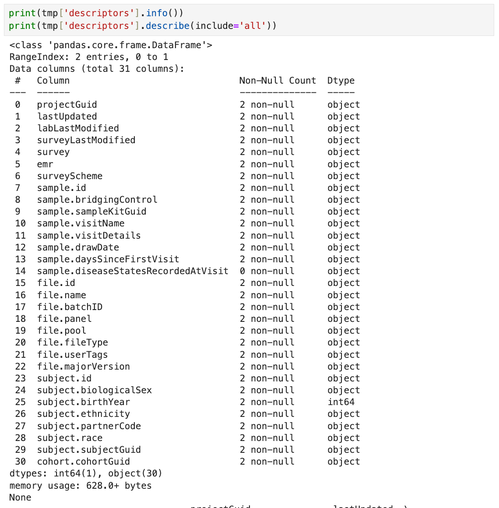
Related Resources
Create Your First HISE IDE (Tutorial)