
Download a Notebook or Environment from an IDE Upload (Tutorial)
Last updated 2026-07-17At a Glance
When someone runs upload_files() (Python) | uploadFiles() (R) from an IDE attached to a study, HISE saves artifacts associated with that upload, including the notebook and the environment used for the work. This tutorial explains how to download a notebook or environment directly, without cloning the full IDE. Use this workflow when you want to inspect, reproduce, or reuse the analysis setup from an upload, but you don't need a complete copy of the IDE.
When to Use This Feature
Use this feature to review or reuse the notebook or software environment tied to an IDE upload without taking the time to clone the full IDE. Downloading the environment is especially useful, for example, when you need to reproduce someone else's results, compare package versions or dependencies, troubleshoot an analysis, or rerun the work in a different IDE or local setup.
NOTE
Use this no-clone workflow if you need only the notebook file itself. If you need a complete working copy of the original IDE, clone the IDE instead.
Instructions
Download a notebook or environment from an IDE instance
Identify the study and IDE instance associated with the uploaded work you want to review,
Use your organizational email address to sign in to HISE.
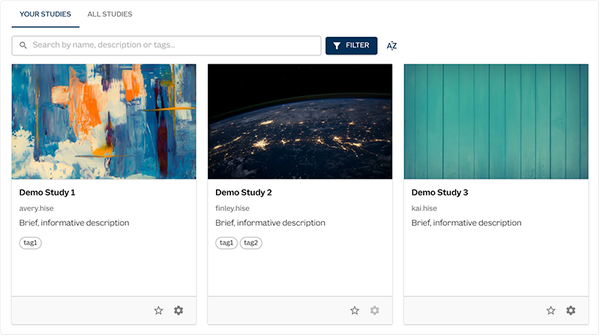
Go to Collaboration space > Your Studies, and click the card for the study you want to see.
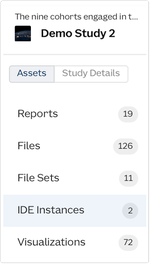
In the side navigation, click IDE Instances.
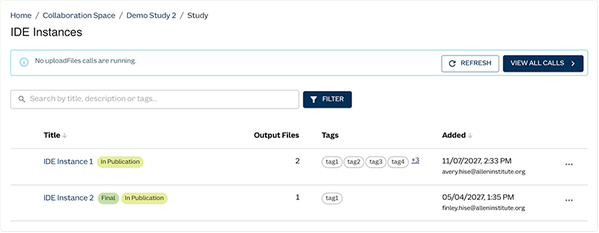
On the IDE Instances page, select the IDE instance that contains the notebook or environment you want to download.
Click ACTIONS, and then choose Download Notebook or Download Environment from the drop-down list.
